Skip to content
jCode

Client projectHigher education2025 · 2026
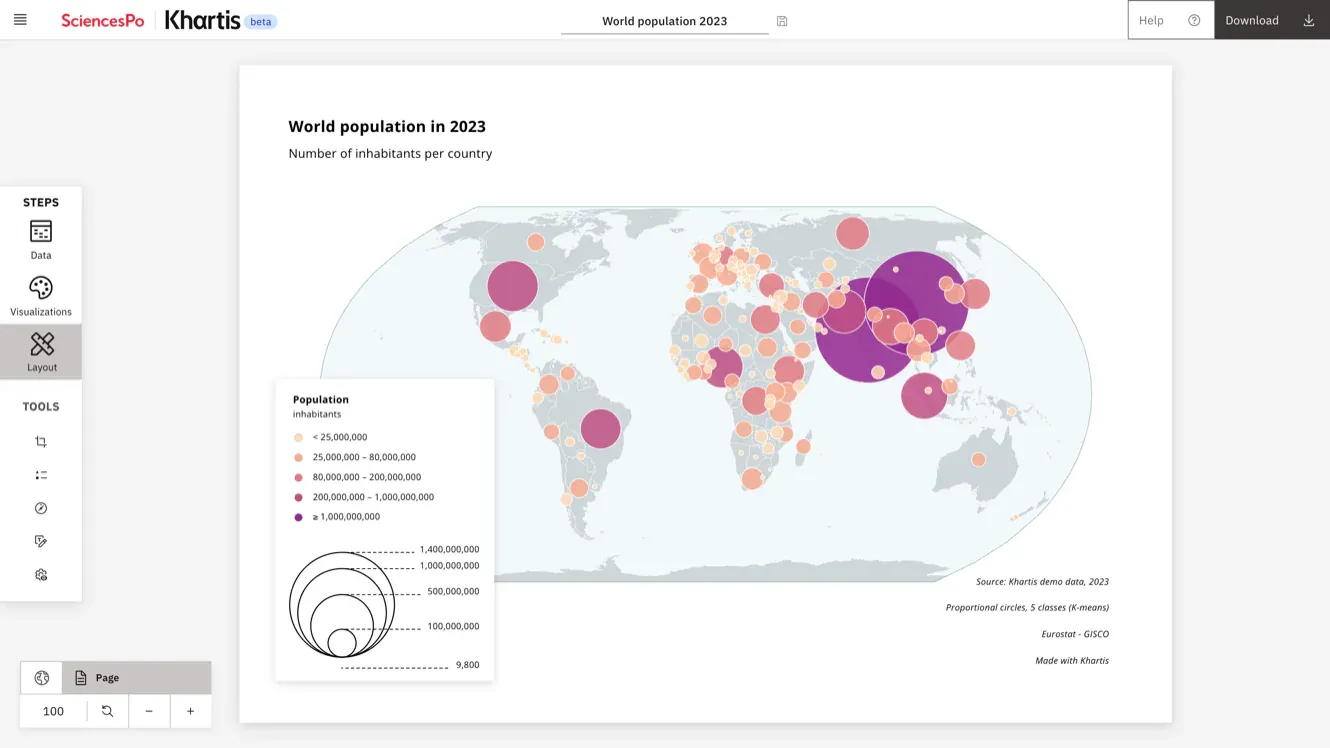
Khartis layout step: a finished world map of population in 2023, proportional circles in five classes from peach to purple, with its title, legend and sources
World population, 2023

Client projectHigher education2025 · 2026

Khartis: Sciences Po's thematic mapping tool

Sciences Po's Cartography Lab designed a complete rewrite of Khartis, its mapping tool for researchers and journalists, and I developed it. Datasets of up to millions of rows become print-quality maps in the browser, even offline, with no data sent to a server.

Client
Sciences Po
Role
Senior full-stack developer, in charge of all development
Duration
18 months, May 2025 to October 2026 (one engagement, three projects)
Setting
Freelance, via RECSI Group, fully remote
001
Context

Version 3 of the Lab's mapping tool

Since 2016, the Cartography Lab (Atelier de cartographie) has offered Khartis to researchers and journalists who need thematic maps without being cartographers. Version 3 is one of the three projects of my Sciences Po engagement, carried out with the Lab's team.

002
What makes it new

A complete mapping tool that runs entirely in the browser

The Lab's design puts every step of map-making on the user's machine, from import and analysis to projection and rendering. My work was to make it run in a web page, with large datasets.

  1. Data analysed where it is opened

    DuckDB, compiled to WebAssembly, runs in a Web Worker with its spatial and Parquet extensions. Every step runs in the browser, and no server ever receives the user's data.

    • DuckDB-WASM in a Web Worker
    • CSV, GeoJSON, Shapefile, GeoParquet
    • No data sent to a server
  2. A binary pipeline from the query to the GPU

    Query results travel as Apache Arrow and GeoArrow columns straight to Deck.gl, which draws them with WebGL2. Projections from d3 give print-quality maps, a MapLibre mode handles tiles and the globe, and basemaps come from a versioned GeoParquet catalogue.

    • Apache Arrow · GeoArrow
    • Deck.gl on WebGL2
    • MapLibre GL
    • National projections
  3. The Lab's cartographic vision, implemented

    The Lab designed the tool and its map semiology, Antoine Rio its interface, and Thomas Ansart the Lab's open-source libraries it builds on, such as projection suggestions and palettes. I implemented every map type and classification, from natural breaks to nested means.

    • Design: Atelier de cartographie
    • Interface: Antoine Rio
    • Open-source libraries: Thomas Ansart
    • Development: Jean-Baptiste Thery
  4. Installable, offline and open source

    Khartis installs as a progressive web app and keeps working offline once its basemaps are loaded. Projects are saved in the browser and exported as SVG, JPG up to 4K or GeoPackage. The app, in French and English, is open source under the MIT licence.
    • PWA, works offline
    • SVG and 4K JPG export
    • MIT licence
    • French and English
003
Approach

How I worked on Khartis

Brief and my role
The Lab supplied the design, the specification, the semiology and the cartographic algorithms. I owned the development, data processing included.
Constraints
Datasets of up to millions of rows, processed without a server, in an app that works offline.
Technical decisions
I implemented the Lab's architecture: DuckDB-WASM and Apache Arrow for the data, Deck.gl and MapLibre for WebGL maps, in a SvelteKit and Svelte 5 PWA on Carbon components.
Checks and releases
I set up automated tests, documentation and a CI/CD pipeline with GitHub Actions.
004
Deliverables

What I delivered on Khartis

  1. In-browser data processingUp to millions of rows analysed on the user's machine with DuckDB-WASM
  2. WebGL map renderingThematic maps drawn with Deck.gl and MapLibre, implementing the Lab's cartographic algorithms
  3. Offline applicationA progressive web app that keeps working without a connection
  4. Architecture and deliverySvelteKit, Svelte 5 and TypeScript, with tests, documentation and CI/CD deployment
005
Technologies and screenshots

Technologies used on Khartis

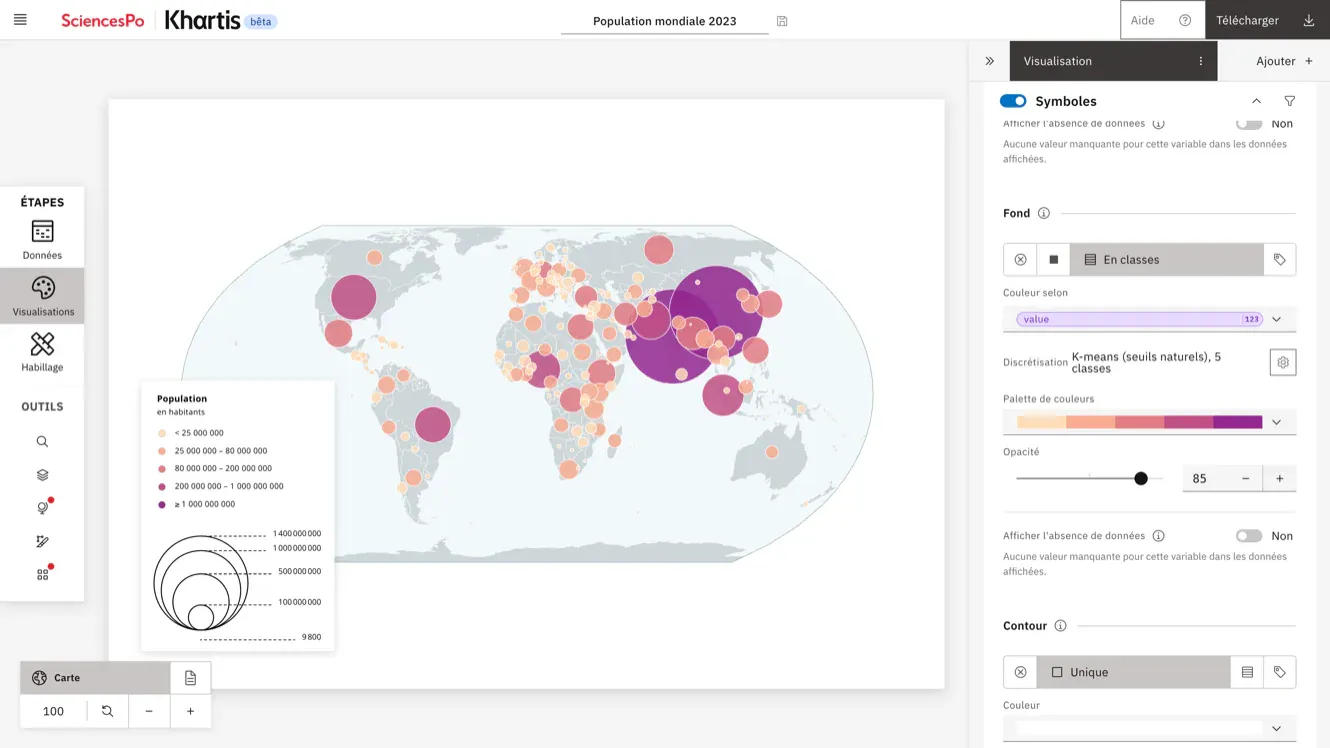
Khartis visualisation step: the world population map beside the settings panel, colour by class with K-means discretisation and a peach to purple palette
Classes and palette
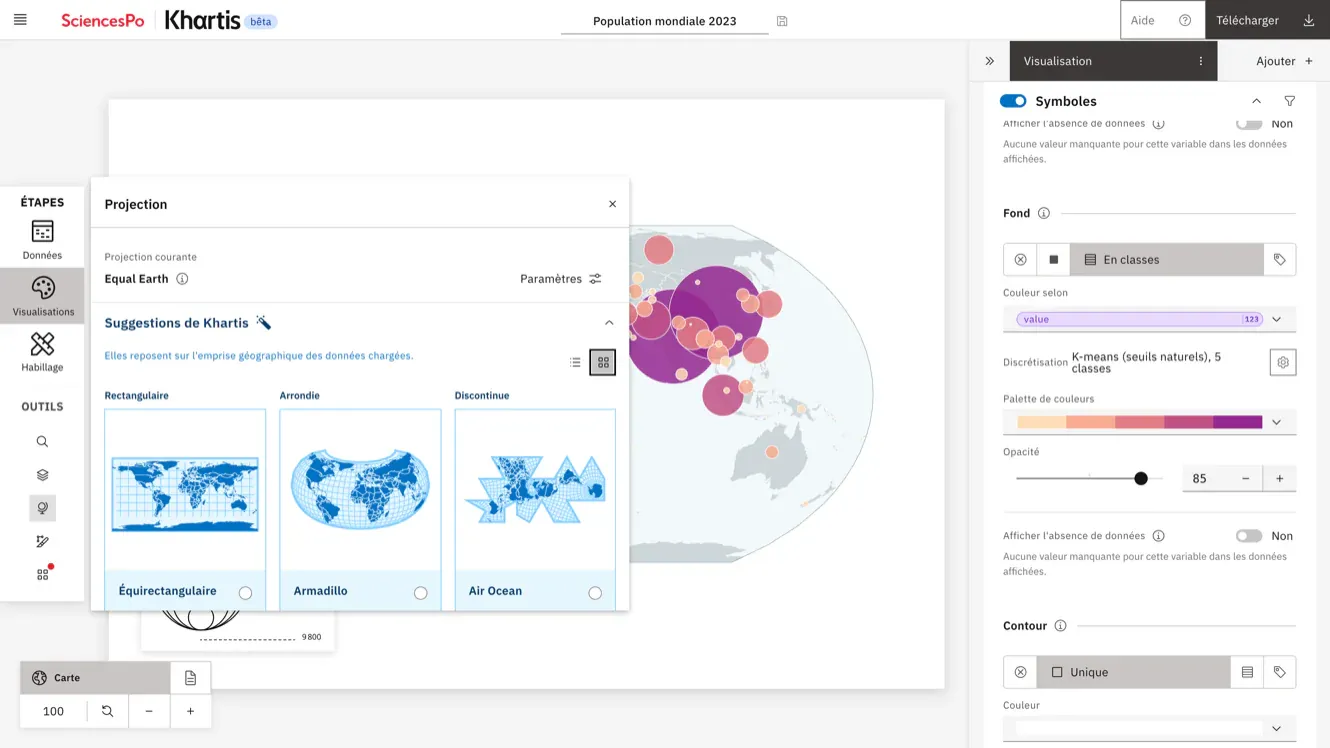
Khartis projection suggestions: rectangular, rounded and interrupted world projections shown as thumbnails beside the map
Projection suggestions
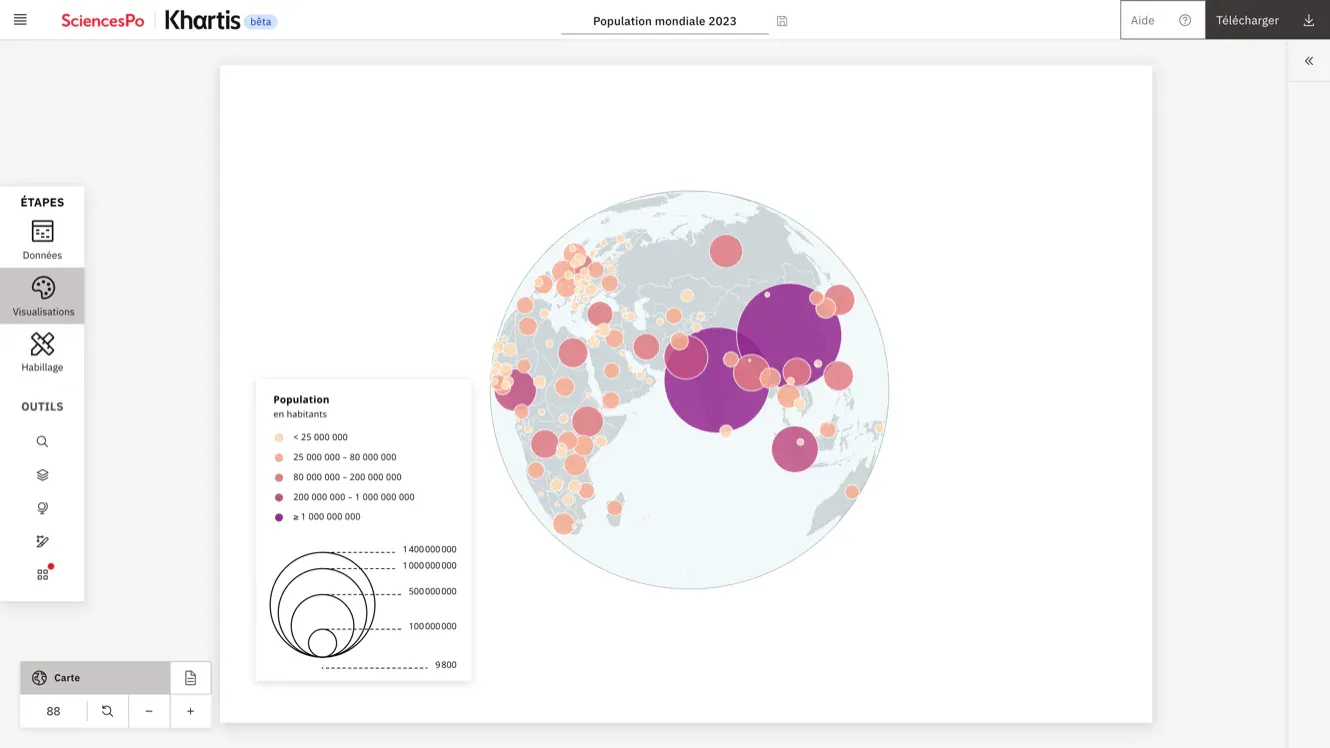
World population as proportional circles on an orthographic globe centred on Asia, with the legend
Orthographic projection
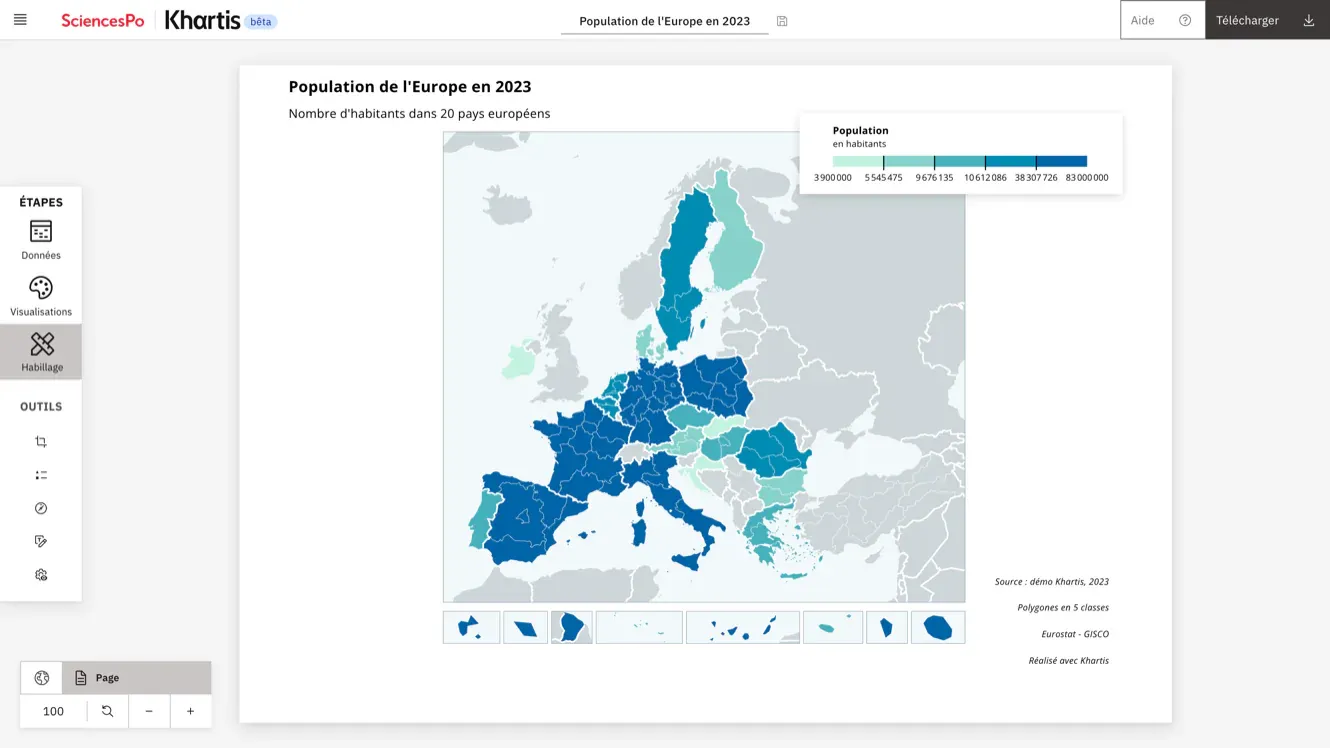
Khartis layout step: choropleth map of population in 20 European countries in 2023, with Eurostat regions, insets for overseas regions, a title and a legend
Europe, choropleth map
007
Contact

Let's talk about your project.

Tell me what you want to build or improve, your budget and your target date.

  • Fully remote
  • English or French
  • France · UK · US